How to Read an ACORD 25 Certificate of Insurance
Karla · · 8 min read
A vendor sends over their certificate of insurance, and you are looking at a dense page of boxes, abbreviations, and small print. You need to know, quickly, whether it actually shows the coverage your contract requires. This guide explains how to read an ACORD 25 section by section, what to check in each part, and the red flags that mean you should go back to the vendor.
This article is general information, not legal or insurance advice. Check your contracts and talk to your insurance broker or attorney about your situation.
What is an ACORD 25?
The ACORD 25 is the standard certificate of liability insurance form used in the US. It is published by ACORD, a nonprofit that creates standard forms for the insurance industry. When you ask a vendor for a “COI”, this is almost always the form you get back.
It is filled in by the vendor’s insurance agent or broker, not by the insurer and usually not by the vendor. It summarizes the vendor’s liability policies on one page. It is not the policy itself. Reading it well is one step in certificate of insurance tracking, which also covers collecting certificates and keeping them current.
How to read an ACORD 25, section by section
Work from top to bottom. The layout is the same on every ACORD 25, which is what makes it quick to review once you know where to look.
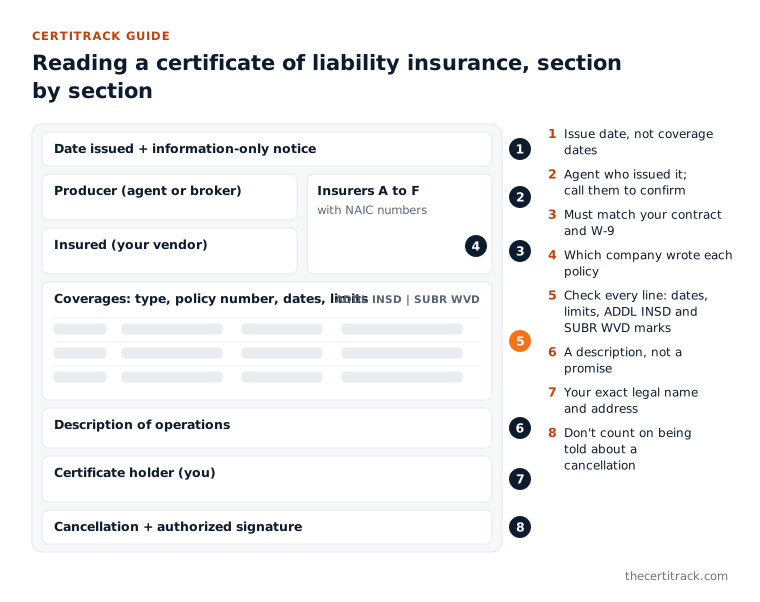
The date and the disclaimer at the top
In the top right corner is a date. This is the date the certificate was issued, not the date any coverage starts or ends. A certificate issued last week can still show a policy that expires tomorrow.
Below the title is a block of capital letters. In short, it says the certificate is issued as a matter of information only, gives no rights to the certificate holder, and does not amend, extend, or alter the coverage of the policies. It also says that if the certificate holder is an additional insured, the policy must be endorsed. Read it once. It explains why the certificate alone is never the final word.
Producer
The producer is the insurance agent or broker who issued the certificate, with their address, contact name, phone, and email. This is the person to contact if anything on the certificate is wrong or needs confirming. A certificate with no producer details is unusual and worth questioning.
Insured
The insured is the business that holds the policies: your vendor. Check this name carefully against your contract and the vendor’s W-9. It should be the same legal entity you are hiring.
Insurers affording coverage
To the right of the producer and insured is a short list of insurance companies, lettered A through F, each with an NAIC number. The NAIC number identifies the insurance company. Each policy in the coverages table points back to one of these letters, so you can see which company wrote which policy.
If you do not recognize an insurer, you can look it up through the NAIC or your state insurance department.
Coverages
This is the main table and where most of your review happens. Each row is a type of insurance. The columns are:
| Column | What it tells you |
|---|---|
| INSR LTR | The insurer letter (A to F) that wrote this policy |
| Type of insurance | The coverage line, with checkboxes for details such as “occurrence” or “claims-made” |
| ADDL INSD | Marked if the policy is said to include additional insured coverage |
| SUBR WVD | Marked if the policy is said to include a waiver of subrogation |
| Policy number | The insurer’s number for the policy |
| Policy eff / Policy exp | The dates the policy starts and ends |
| Limits | The dollar amounts the policy will pay, broken down by type |
The lines you will usually see:
- Commercial general liability. Limits are listed for each occurrence, damage to rented premises, medical expense, personal and advertising injury, general aggregate, and products-completed operations aggregate. There are also checkboxes showing whether the general aggregate applies per policy, per project, or per location.
- Automobile liability. Checkboxes show which vehicles are covered (for example any auto, owned autos only, hired autos, non-owned autos), with limits for bodily injury and property damage or a combined single limit.
- Umbrella or excess liability. Extra limits that sit on top of the underlying policies, shown as each occurrence and aggregate.
- Workers compensation and employers’ liability. Workers compensation is usually marked as statutory, meaning it follows the state’s rules. Employers’ liability has three limits: each accident, disease for each employee, and disease policy limit.
- Other lines. A blank row at the bottom can show other coverage, such as professional liability.
Description of operations, locations, vehicles
This box is free text. Agents use it to name a project, a job site, or a contract, and sometimes to mention additional insured or waiver of subrogation status. Read it, but treat it as a description, not a promise. Wording in this box does not change the policy.
Certificate holder
The certificate holder is you: the person or business that requested the certificate. Your name and address should be exactly as you asked. Being the certificate holder means you receive the certificate. It does not, on its own, give you any coverage under the vendor’s policy.
Cancellation
This box says that if any of the listed policies is cancelled before its expiration date, notice will be delivered “in accordance with the policy provisions.” In practice, that means you should not assume you will be told if the vendor’s policy is cancelled. Your own tracking needs to catch it.
Authorized representative
The signature of the agent or broker who issued the certificate. It confirms who stands behind the information.
What to check against your contract
Reading the form is half the job. The other half is comparing it, line by line, with what your contract requires. Use this as a checklist:
- Insured name matches your contract and the vendor’s W-9.
- Every required coverage line is present.
- Every policy is in force today: the effective date has passed and the expiration date has not.
- Limits meet or exceed what your contract requires for each line, including both per-occurrence and aggregate amounts.
- Certificate holder shows your correct legal name and address.
- Description box mentions your project or location if your contract requires that.
- Endorsements your contract requires (additional insured, waiver of subrogation, primary and non-contributory) are confirmed separately. More on that below.
Say your contract requires general liability and workers compensation, and the certificate shows only general liability. That is not compliant, however good the general liability limits look.
Red flags to watch for
These come up again and again:
- Expired dates. Check these first. Check every policy line, since policies on the same certificate often expire on different dates.
- Wrong insured name. A parent company, a trade name, or a different LLC from the one on your contract.
- Limits below your contract. Often the aggregate, which is easy to miss next to a high per-occurrence limit.
- Missing lines. Workers compensation, auto, or umbrella left off.
- Certificate holder details wrong. A misspelled name or an old address. Small, but it suggests the certificate was reused rather than issued for you.
- Description box promises. Phrases like “certificate holder is named as additional insured” in the description, with no endorsement to back them up.
- Signs of editing. Mismatched fonts, missing producer details, or numbers that do not line up. If in doubt, call the producer and ask them to confirm.
What the certificate cannot tell you
An ACORD 25 cannot confirm that endorsements are actually on the policy. A mark in the ADDL INSD or SUBR WVD column, or a sentence in the description box, is not the endorsement. As the form itself says, additional insured status requires an endorsement on the policy.
To confirm an endorsement, ask the vendor or their agent for a copy of the endorsement and read it, or ask your own broker to review it. This is a human check. CertiTrack does not verify endorsements for you: its AI reads the dates, policy numbers, insurers, and coverage amounts from the certificate, and you confirm what it read.
The certificate also cannot tell you if a policy has been cancelled since it was issued. That is why you ask for a fresh certificate at each renewal and keep track of every expiration date. CertiTrack emails the vendor at 90, 60, 30, and 7 days before a document expires, with a copy to your team, so renewals are not left to memory. Its Free plan covers up to 5 vendors; see pricing if you have more.
For the full list of documents to keep on file beyond insurance, see the vendor compliance checklist.
Common questions
What does “statutory” mean in the workers compensation section?
It means the workers compensation coverage follows the requirements set by state law, rather than a dollar limit chosen by the buyer. Employers’ liability, listed beside it, does have dollar limits.
What is the difference between occurrence and claims-made?
An occurrence policy covers incidents that happen during the policy period, whenever the claim is made. A claims-made policy covers claims made during the policy period, subject to its terms. General liability is usually written on an occurrence basis; professional liability is often claims-made. Ask your broker if your contract requires one or the other.
Is an ACORD 25 the same as an ACORD 28?
No. The ACORD 25 is a certificate of liability insurance. The ACORD 28 is an evidence of commercial property insurance form, used to show property coverage, often for landlords or lenders.
Can a certificate of insurance be issued without the policy being in force?
A properly issued certificate reflects the policies in force on its issue date, but it is a snapshot. Policies can be cancelled or changed afterward. If something looks wrong, contact the producer listed on the certificate to confirm.